Let’s be honest: waiting is the worst. Whether you are standing in line for coffee or staring at a download timer counting down from ten, nobody likes losing time. If you frequently share files or download content, you know the struggle of clicking a link, landing on a page full of flashy banners, and hunting for the actual “Download” button hidden somewhere in the chaos.
Enter the MF DirectX MediaFire Direct Download Tool Script. This isn’t just another utility; it is a game-changer for web developers and content sharers who want speed, efficiency, and zero distractions. If you have been looking for a way to generate direct download links instantly, you have landed on the right page. Let’s dive into what makes this tool a must-have for your digital toolkit.
What is the MF DirectX MediaFire Direct Download Tool?
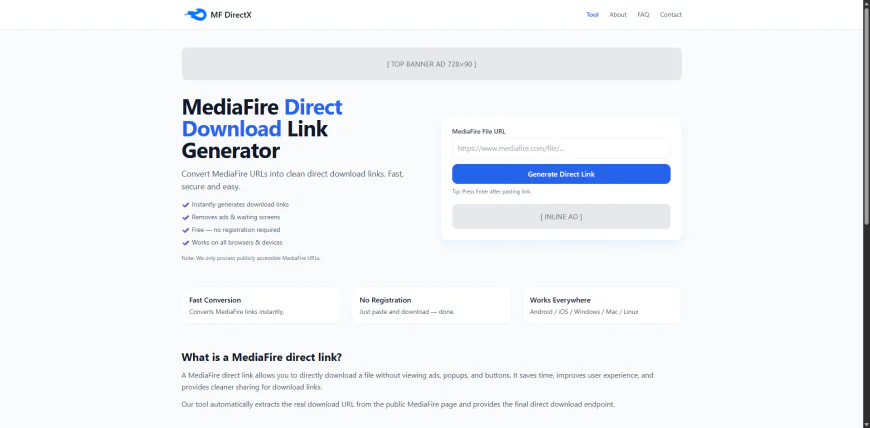
The MF DirectX Script is a lightweight, high-performance PHP script designed to interact with file hosting URLs. Its primary job is simple but powerful: it takes a standard “view” link (the one that opens a web page) and converts it into a “direct” link.
When you use a direct link, the file download starts immediately upon clicking. There are no landing pages, no pop-ups, and definitely no waiting for a timer to hit zero. It is named “DirectX” because it cuts straight to the point—just like the graphics API accelerates your games, this script accelerates your workflow.
Why You Need This Script
You might be thinking, “Can’t I just click the button manually?” Sure, you can. But if you are running a file-sharing website, a community forum, or a tech blog, manual work doesn’t scale.
1. Better User Experience Your visitors want your content, not a scavenger hunt. By using the MF DirectX Tool, you provide them with a seamless experience. They click, they receive. A happy user is a returning user.
2. Automation Friendly If you are a developer, you know the value of API-like functionality. This script can often be integrated into larger projects, allowing you to fetch files programmatically without needing a browser interface.
3. Lightweight Codebase Bloated software slows down servers. This script is written with optimized PHP code, ensuring it runs smoothly on even the most modest shared hosting plans. It uses minimal server resources while delivering maximum speed.
Key Features of MF DirectX Script
- Instant Conversion: Generates links in milliseconds.
- Ad-Free Experience: Bypasses standard landing pages completely.
- Easy Integration: Simple PHP structure makes it easy to add to WordPress or custom sites.
- Mobile Compatible: Works perfectly for users on mobile devices where pop-ups are a nightmare.
- Secure Processing: Does not store user data or file logs, ensuring privacy.
How to Install and Use
Getting started with the MF DirectX MediaFire Direct Download Tool is straightforward. You do not need a degree in rocket science, just some basic knowledge of how to upload files to a server.
- Download the Script: Get the file from the download section below.
- Upload to Host: Use your File Manager or FTP client to upload the script to your server (e.g.,
public_html/tools). - Configuration: Open the config file (usually
config.php) if you need to set up any specific API keys or proxy settings. - Run: Open the URL in your browser. Paste your original file link into the input box and hit “Generate.”
- Result: Copy your fresh, direct download link and share it with the world.
Tips for Best Performance
- Keep PHP Updated: Ensure your server is running PHP 7.4 or higher for the best security and speed.
- Use Caching: If you are generating links for the same files often, implement a simple cache to save server requests.
- Respect Limits: While this tool is powerful, always respect the terms of service of the file host you are interacting with. This tool is meant for legitimate file management and easier access to your own content.
Conclusion
Time is money, and the MF DirectX MediaFire Direct Download Tool Script saves you both. It removes the friction between your users and your files, streamlining the download process into a single click. Whether you are a webmaster trying to declutter your site or a developer looking for a quick automation fix, this script handles the heavy lifting for you.
Stop making your users wait. Upgrade your file-sharing strategy today with this simple, effective, and free solution.
Frequently Asked Questions (FAQs)
Q1: Is the MF DirectX script free to use? Yes, this version of the tool is available for free download. It is open for modification if you want to tweak the code for your specific needs.
Q2: Does this work on shared hosting? Absolutely. The script is very lightweight and does not require a VPS or dedicated server. It runs perfectly on standard shared hosting environments.
Q3: Can I use this for bulk links? The standard version processes one link at a time. However, since the code is open, a developer could easily loop the function to handle bulk lists.
Q4: Is it safe for AdSense websites? Yes. The script itself is a utility. As long as the content you are linking to is policy-compliant (no copyright infringement or illegal files), using a tool to improve user experience is generally safe.
Q5: What PHP version do I need? We recommend PHP 7.4 or PHP 8.0+ for optimal performance and security standards.
Download Section
Ready to speed up your downloads? Click the button below to grab the latest version of the script.
Download MF DirectX Script v1.0 – ZIP File